








Skip to content
AutoPoly POLYLANG ADDON

Polylang AI Translation Addon

AutoPoly connects Polylang with OpenAI, Gemini, DeepL, Google Translate and more AI providers to bulk translate your WordPress site in minutes.

4,500+
Active Installs
25+
5-Star Reviews
4.9 / 5
Overall Rating
AutoPoly support team members Excellent Support Team
Polylang AI Providers

Connect Polylang with AI Providers

Use AutoPoly with Polylang to connect supported AI providers like OpenAI, Gemini, Google Translate, and more for translation automation.

Your plugin
Polylang
Polylang
Multilingual setup
Our addon
AutoPoly
AutoPoly
AI translation bridge
AutoPoly featured capability for Polylang
Bulk Translation

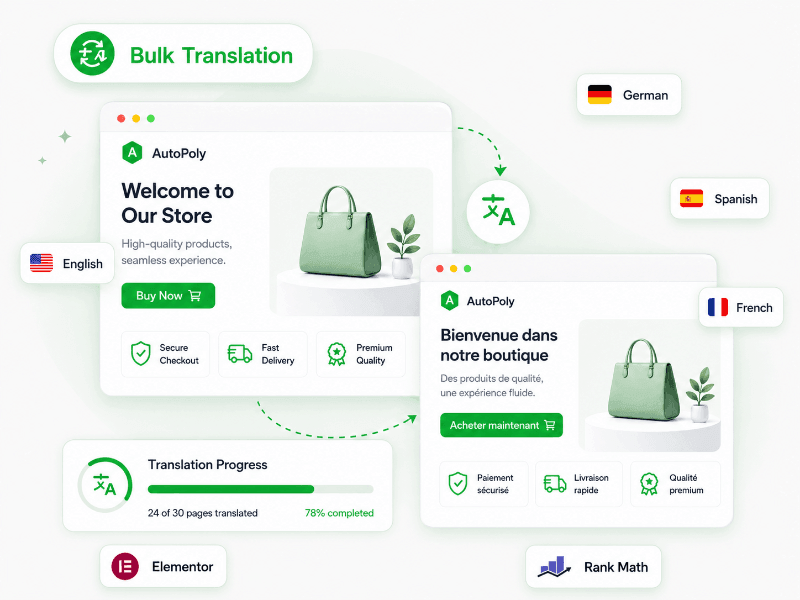
Bulk Translate Your Multilingual WordPress Site with Polylang

AutoPoly helps you bulk translate your multilingual website content managed by Polylang using AI translation providers.

  • Translate posts, pages, categories and custom content.
  • Translate Elementor, Divi and other builder-based content.
  • Translate Yoast and Rank Math SEO titles and descriptions.
  • Translate WooCommerce products for multilingual stores.
Get AutoPoly
More Features

Why You Should Use AutoPoly with Polylang for AI Translations?

AutoPoly - The smart Polylang addon for automatic WordPress translation.

Multiple AI Providers

Connect Polylang with OpenAI, Gemini, DeepL, Google Translate, Yandex Translate and Chrome AI.

Unlimited Translations

Translate unlimited content using Google Translate or Chrome AI without extra API translation cost.

Bulk Translation

Translate posts, pages and custom post types across your multilingual website in one action.

Elementor Translation

Bulk translate Elementor pages and templates while keeping your page builder layout perfect.

Re-translation

Re-translate already translated pages with AI to update old translations after changing your content.

Glossary Support

Create a custom glossary to keep important words, brand terms and special meanings translated correctly.

Why automate Polylang translation?

Stop Overpaying for Manual Translations

Here's the simple math most Polylang sites get wrong. The same content, translated two ways - see what each one really costs.

Manual translation

The slow, expensive way

  • Hire human translators for every target language
  • Pay $0.10 to $0.20 per word, per language
  • Wait 2 to 3 weeks per round with revisions
  • Re-pay every time your Polylang content changes
$1,000+
to translate ~10,000 words to one language manually
2-3 weeks
turnaround per language, with revisions
With AutoPoly + Gemini AI

The fast, affordable way

  • One-click bulk translate your multiple pages
  • Pay your AI provider directly - sub-cent per word
  • Done in minutes, not weeks
  • Re-run on any content change for the same cost
Under $5
same 10,000 words via Gemini 2.5 Flash · ~$0.10 per 1M tokens
5-10 minutes
to translate the same content, end to end
Pricing

AutoPoly - Polylang Addon Pricing

Get AutoPoly or upgrade to the bundle.

AutoPoly
AutoPoly
For Polylang
$89
$79 /year
Save 11%
  • AI translation for Polylang
  • Supports OpenAI, Gemini, DeepL, Chrome AI, Google & Yandex
  • Get premium support and updates
Get AutoPoly - $79

14-day money-back guarantee

Loved by Polylang professionals

Polylang Users Translate Websites Faster with AutoPoly

Multilingual websites running Polylang plugin loves to use AutoPoly to bulk-translate WordPress sites with their preferred AI provider.

★★★★★

I had an issue with some configurations during setup, but the support team helped resolve it immediately.

★★★★★

This plugin is doing a better job for me with translation than other AI plugins I tried before on my website. I just plug it with Gemini Pro and I've paid less than $1 for massive translates on my website with the 2.5 Flash model.

★★★★★

I recommend investing in the Pro version which allows you to translate with Google Translate, OpenAI, Gemini, and DeepL. The free version uses Yandex and Chrome Built-in AI.

@tizianogrifoni
@tizianogrifoni
Verified review on WP.org
★★★★★

I was impressed by the efficiency of the support team. They helped us resolve several issues with great competence and professionalism. Highly recommended.

★★★★★

I had some minor problems, due to my own misunderstanding of how the plugin works. Thanks to the developers huge understanding and many good replies helping me to figure out things without giving access to my website.

★★★★★

If you use Polylang to manage the languages of your WordPress website, the AI Translation for Polylang plugin will become your best ally.

Your AutoPoly license includes plugin download access, a license key, automatic updates and premium support while your license is active. You can choose a yearly license or a lifetime plan based on your website needs.

If you choose a yearly license, updates and support will stay active during the license period. After the license expires, the plugin may continue working on your site, but you will need an active license to receive new updates and premium support.

AutoPoly works as a connector between Polylang and AI providers. It does not include AI credits. For providers like OpenAI, Gemini or DeepL, you need to connect your own API key. For help, you can contact our support team.

Yes. AutoPoly helps you bulk translate Polylang content, including posts, pages, categories, tags and custom post types.

This is useful when you already manage your multilingual WordPress website with Polylang and want to avoid translating every page one by one. You can connect an AI provider, select your content and speed up the translation process from inside WordPress.

AutoPoly lets you connect Polylang with multiple AI translation providers, including OpenAI, Gemini, DeepL, Google Translate, Yandex Translate and Chrome AI.

For OpenAI, Gemini and DeepL, you need to use your own API key from those providers. Their cost depends on your usage and their own pricing. For Google Translate, Yandex Translate or Chrome AI, you can use the available setup inside AutoPoly which helps you translate free of cost.

Check all AI providers for Polylang

Yes. AutoPoly can help you translate page builder content used on a Polylang website, including Elementor, Divi and similar builder-based layouts.

It focuses on translating the text content while keeping your original page layout, sections and design structure safe. This is helpful for landing pages, service pages, product pages and custom page layouts.

Yes. AutoPoly can help translate SEO fields such as Yoast SEO and Rank Math titles and descriptions where supported by your Polylang setup.

This is important because a multilingual website should not only translate visible page content. Search titles and meta descriptions also need proper translation so your language pages look better in Google search results.

Yes. AutoPoly supports re-translation, so you can translate already translated content again after making changes to the original page.

This is useful when you update your main English page and want the same changes to be reflected in other languages. Instead of manually editing each translated version, you can run AI translation again and refresh the language content faster.

Yes. AutoPoly can help translate WooCommerce product content used with Polylang, including product titles, descriptions, categories and other product-related text.

This is useful for online stores that sell in different countries or want to provide product information in multiple languages. You can build a better shopping experience for multilingual customers without manually editing every product.

Yes. AutoPoly comes with a 14-day refund policy for eligible purchases. You can read the full terms here:
Read the refund policy

If you want the best value, you can also check the TranslateXYZ bundle. It includes AutoPoly, AutoTP, AutoMLP and LocoAI together at a better price than buying each addon separately.

View AutoPoly pricing and bundle offer