







Skip to content
LocoAI LOCO TRANSLATE ADDON

Loco Translate AI Translation Addon

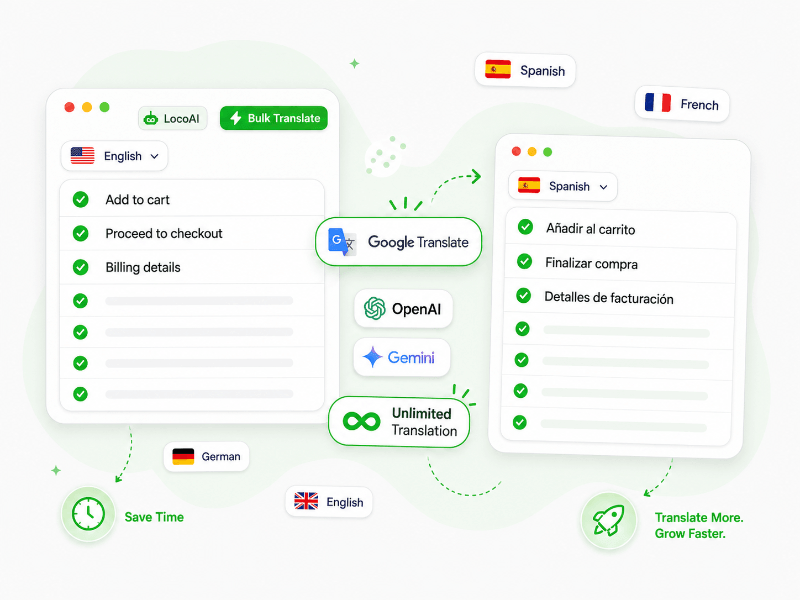
LocoAI connects Loco Translate with OpenAI, Gemini, Google Translate and Chrome AI to translate WordPress plugin and theme strings automatically.

75,000+
Active Installs
600+
5-Star Reviews
4.9 / 5
Overall Rating
LocoAI support team members Excellent Support Team
Loco Translate AI Providers

AI Providers for Loco Translate

Connect Loco Translate with AI providers like ChatGPT, Gemini, Google Translate, and more using LocoAI addon for faster plugin and theme string translation.

Your plugin
Loco Translate
Loco Translate
Multilingual setup
Our addon
LocoAI
LocoAI
AI translation bridge
LocoAI featured capability for Loco Translate
Unlimited Translation

Translate WordPress Plugin and Theme Strings with AI

Translate WordPress plugin and theme strings without worrying about API costs by using Chrome built-in AI and Google Translate.

  • Translate thousands of plugin and theme strings quickly.
  • Translate .po and .mo files for plugins and themes.
  • Use Google Translate for fast string translation.
  • Use Chrome built-in AI without any translation API cost.
Get LocoAI
More Features

Why You Should Use LocoAI with Loco Translate for AI Translations?

LocoAI - The smart Loco Translate addon for automatic WordPress translation.

Multiple AI Providers

Translate plugin and theme strings with OpenAI, Gemini, DeepL, Google Translate and Chrome built-in AI.

Unlimited Translations

Translate unlimited strings using Google Translate or Chrome built-in AI without extra API cost.

.po/.mo File Support

Translate WordPress .po and .mo language files with AI directly from your WordPress admin dashboard.

Batch Processing

Translate all strings in a .po file with one click and save hours of manual translation work.

Offline Translation

Use Chrome built-in AI in your browser without an API key for private, browser-based translation.

75,000+ Active Installs

Trusted by thousands of users for faster plugin, theme and string translation from WordPress.org.

Manual .po editing vs AI localization

Translate Theme and Plugin Strings in Seconds, Not Days

Localizing a WordPress theme or plugin means translating hundreds of .po/.mo strings. LocoAI runs the whole file through your AI provider in one click.

Manual .po editing

Translating strings by hand

  • Translate every theme/plugin string one by one in Loco's editor
  • Hire translators or crowdsource via GlotPress for each locale
  • Repeat the same work after every plugin or theme update
  • Inconsistent terminology across hundreds of strings
8-16 hours
to translate ~500 plugin strings to one language manually
Per locale
multiplied for every language you want to ship
With LocoAI + Gemini

AI-translate the entire .po file

  • One click translates a full .po file via your AI provider
  • Supports OpenAI, Gemini, DeepL - or offline Chrome AI
  • Re-run after every plugin update - zero manual re-work
  • Consistent terminology across every string in the file
Under 60s
to bulk-translate ~500 strings to one language with Gemini
Free
using offline Chrome AI - no API key required
Pricing

LocoAI - Loco Translate Addon Pricing

Get LocoAI or upgrade to the bundle.

LocoAI
LocoAI
For Loco Translate
$49
$39 /year
Save 21%
  • AI translation for Loco Translate
  • Supports OpenAI, Gemini, DeepL, Chrome AI, Google & ChatGPT
  • Get premium support and updates
Get LocoAI - $39

14-day money-back guarantee

Loved by theme & plugin makers

LocoAI Saves Hours on Every Plugin or Theme Strings Translation

Theme authors, plugin maintainers and translators loves to use LocoAI with Loco Transalte plugin to auto-translate .po/.mo files.

★★★★★

Excellent plugin for bulk translations. It has saved me a lot of time translating theme and plugin strings quickly and efficiently.

★★★★★

Loco Translate is already an essential tool for translations in WordPress, but translating every single word one by one can be very time-consuming. Thanks to Automatic Translate Addon For Loco Translate.

★★★★★

Automatic Translate Addon For Loco Translate is an incredible plugin that simplifies and accelerates the translation process. It's a fantastic solution for both professionals and beginners.

★★★★★

Really amazing, just clicked and now my theme is in Spanish, just like that. Especially useful for themes not already translated.

★★★★★

I have tried several translation plugins to translate my website and its plugins. You can simply edit and translate pages into your language but not plugins.

@bakhtiyor1chi
@bakhtiyor1chi
Verified review on WP.org
★★★★★

I could not find anything free and better than this so far. This app saved my encouragement because I was about giving up my project till this app appears and helps me.

Your LocoAI license includes plugin download access, a license key, automatic updates and premium support while your license is active. You can choose a yearly license or a lifetime plan.

With a yearly license, updates and support stay active during the license period. If the license expires, you can renew it anytime to continue receiving new updates and premium support.

LocoAI works as a Loco Translate AI addon. It helps connect Loco Translate with AI providers for faster plugin and theme string translation.

LocoAI supports multiple AI providers for WordPress string translation, including OpenAI, Gemini, DeepL, Google Translate and Chrome AI.

You can choose the provider based on your translation needs. For example, you may use OpenAI with Loco Translate for quality-focused translation, Gemini AI with Loco Translate for AI translation or Google Translate with Loco Translate for fast string translation.

LocoAI adds Google Translate support inside the Loco Translate workflow, so you can translate plugin and theme strings faster without manually copying each string into another tool.

This is helpful when a plugin or theme has many strings and you want a quick first translation. You can then review important strings before using them on a live website.

You can check more details here: Google Translate for Loco Translate.

Yes. LocoAI supports Chrome AI for Loco Translate where available. This can help you translate strings without adding a separate AI API key.

It is a good option for users who want browser-based translation and want to avoid extra API translation cost where possible. Availability can depend on your browser and device setup.

Yes. LocoAI is built to save time when working with large plugin or theme language files.

Instead of translating every string manually, you can use AI providers to translate many strings faster. For best results, always review important strings like checkout labels, error messages and customer-facing text before final use.

Yes. LocoAI includes a 14-day refund policy for eligible purchases. You can check the full refund terms here:
Read refund policy

If you also need AI translation for WPML, Polylang or TranslatePress, you can choose the TranslateXYZ bundle and get all 4 addons together at a better value.

View LocoAI pricing and bundle offer